

Open the Connect modal
In the Studio at app.powabase.ai, click the Connect button in the top-right of your project header.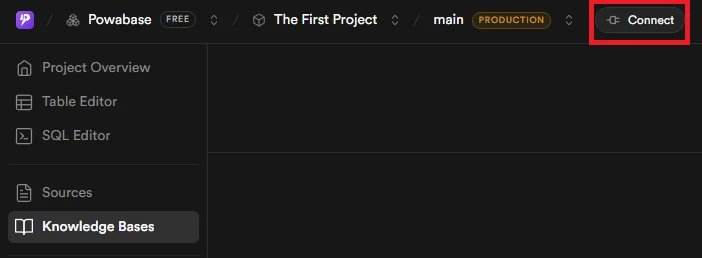
The Connect button lives in the project header.
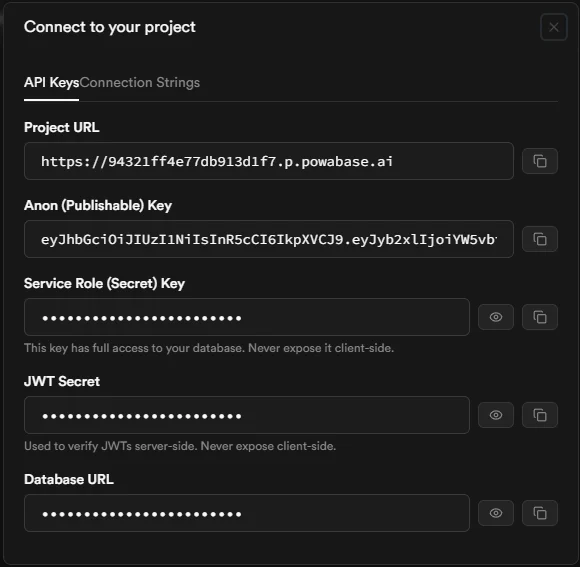
The API Keys tab: every credential your project exposes lives here.
What’s in the modal, and where to use each value
The rest of this guide uses the Service Role (Secret) Key as
API_KEY. It authenticates every endpoint under /api/*, which is what most of the platform docs assume. Most of those endpoints accept nothing else; see Which key for which route.
Which key for which route
Every/api/* route takes a bearer token in Authorization. There are two kinds of caller:
- Your backend, with the service role key. Send the key as both
apikeyandAuthorization: Bearer. Every/api/*route accepts it. The Studio calls the API the same way. - A signed-in end user, with their own access token. Send the Anon key as
apikeyand the user’s access token (the JWT your project’s Auth service returned at sign-in) asAuthorization: Bearer. Only the 16 conversation routes below accept it, and only for that user’s own sessions and runs.
/api/* route answers an end-user token with 403:
/api/database/* proxy. Two routes take no bearer at all because they verify their own secret: the inbound workflow webhook (POST /api/webhooks/{webhook_id}, verified by the per-webhook secret; see Webhooks) and the documentation search used by the Studio’s Copilot (POST /api/internal/docs/search).
End-user routes
These are the only routes an end user’s access token may call. The service role key works on them too.
A session, run or paused run that belongs to someone else, or that your backend created without a
user_id, answers 404 as if it didn’t exist. There is no end-user route to create or delete an orchestration session: a run creates one.
Rules for end-user runs
-
The token must name the user and expire. The API accepts a JWT with audience
authenticated, signed with your project’s JWT secret, whosesubis a UUID and which carries anexp. Anything else answers401. Tokens from your project’s Auth service always qualify; this matters only if you mint your own. -
The run uses the agent’s own knowledge bases. An end user’s run body may not set
knowledge_bases,runtime_knowledge_bases,context_handler_id, or by-referencecontext_items(items with anitem_id). Sending any of them answers403with a body that names the fields:context_overrideand by-valuecontext_items(items withtext) are still allowed, because the user supplies that text themselves. -
An end user can continue only their own existing session, and can never name a new one. A
session_idin a run body or a path must be a string of at most 255 characters, or the request answers400. A run continues a session only if it already exists and belongs to the caller, for the same agent or orchestration; any othersession_idanswers404(a streamed run ends with the event{"event": "error", "error": "Session not found"}). To start a conversation, omitsession_id(the run creates a session owned by the user and returns its id) or callPOST /api/agents/{agent_id}/sessions. This stops a user from creating a session under an id your backend would later pick, such as one derived from a phone number, and reading or steering what your backend’s runs say in it. -
An end user approves only the paused runs they started. A run your backend started with the service role key has no end-user owner, even in a session created with that user’s
user_id, so only the service role key can approve it. Relay the user’s decision from your backend.
Running agents for a user from your backend
When a run needs something end users can’t send, such as knowledge bases chosen per request, run it from your backend with the service role key. Passuser_id when you create the session (POST /api/agents/{agent_id}/sessions with {"user_id": "<the user's id>"}) so the conversation still belongs to that user: they can list it, read it, and continue it with their own token. Only the service role key may set user_id; an end user who sends it gets 403.
A run made with the service role key is a service-role run, even in a session owned by a user. Its data tools don’t act as that user; see the next section.
What agent data tools act as
An agent’sdatabase_query, database_write, storage_read and storage_write tools act as whoever started the run:
The per-tool limits (which tables can be configured, what
database_query accepts, the 30-second timeout, and the bucket and path rules for storage tools) are in the Tools reference.
Migrating from earlier versions
Before 0.12.0, most/api/* routes accepted any signed-in user’s token. To upgrade:
- If your backend forwarded an end-user JWT to knowledge-base or source routes (or any other route outside the table above), switch those calls to the service role key.
- If your client sent
knowledge_baseson a run (orruntime_knowledge_bases,context_handler_id, or by-referencecontext_items), configure the knowledge bases on the agent instead withPOST /api/agents/{id}/knowledge-bases. If the choice has to be made per request, run the agent from your backend with the service role key and passuser_idwhen you create the session. - If your clients started sessions under ids they chose, have them omit
session_idon the first run or callPOST /api/agents/{agent_id}/sessions, and use the id that comes back. - If you mint your own user JWTs, give them a UUID
suband anexp. - If you self-host, set
SERVICE_ROLE_KEYon the API service. Without it no caller counts as the service role: a request that bears the service role key is decoded as an end-user token and answers401, and every management route is unreachable. - If an agent has database tools, check its configured tables. They must be plain or partitioned tables or views created
WITH (security_invoker = true), and service-role runs now reach exactly those tables and nothing else.
Use it from code
1
Set your Base URL and headers
Every request to /api/* and /rest/v1/* needs both an
apikey header and an Authorization: Bearer header. From your backend, set both to the Service Role (Secret) Key; that’s what /api/* and server-side PostgREST calls use. (A browser calling an end-user conversation route sends the Anon key as apikey and the user’s access token as Authorization instead.)Endpoint: Headers: apikey + AuthorizationSending only one of the two headers is the most common cause of 401 errors. PostgREST and Kong both reject the request.
2
Verify your setup
Hit a cheap, idempotent endpoint to confirm the credentials work end-to-end. An empty array and a populated array both count as success.Endpoint: Response:
GET /api/agents3
Connect directly to Postgres (optional)
For migrations, dashboards, ORMs, or any tool that speaks the Postgres wire protocol, grab the Database URL from the API Keys tab, or open the Connection Strings tab and copy a pre-built snippet in your language. Use this from servers and trusted environments only.Endpoint:
Postgres wire protocolThe Database URL embeds the database password in cleartext. Treat it like the Service Role key: never commit it, never expose it client-side, and rotate the database password (Studio → Settings → Database) if it leaks.
What’s Next
Quickstart
Build an end-to-end RAG agent in 5 minutes.
Database Access
AI schema vs public schema, plus PostgREST and direct Postgres usage.
Architecture
How Kong routes /api/, /rest/v1/, /auth/, and /storage/ to your project’s stack.